Request Your Free SEO Audit
Type your website and where to send the report. Fields marked with an asterisk (*) are required.
Your Audit Is Running
We are scanning your website. The report goes to your inbox in about 5 minutes.
Check your inbox, and your spam or junk folder too. The email comes from The Equation Agency LLC.
If your site cannot be checked automatically, Victor J. Rosario reviews it personally and replies, usually the same business day.
On this page
Start Here: Page Speed Is the First Thing Google Measures
Before anyone reads your words, your page has to load. Google measures how fast it appears, how fast it reacts to a tap and how steady it stays while it loads. Your visitors feel the same three things, usually on a phone.
That is why our audit starts with page speed and Google's technical requirements. Only then does it move on to SEO. A slow or broken page wastes every dollar you spend on content, ads and design.
The order matters for a second reason. Speed and technical problems block everything else. Better content cannot rank if Google cannot crawl the page, and a stronger offer cannot sell if the page takes eight seconds to load. Fix the foundation first, and every later improvement works harder.
This guide explains what Google's tools measure and what the numbers mean. It shows how they can raise or lower your traffic, and what to do about them. Would you rather hear it from a person? Book a free consultation. It costs nothing.
What PageSpeed Insights and Lighthouse Measure
PageSpeed Insights is Google's free speed test. You enter a page and it returns two kinds of results. The first is a Lighthouse report. The second is real-user data from the Chrome UX Report, when Google has enough visits to your site to show it.
Lighthouse loads your page in a lab, on a simulated mid-range phone with a slow mobile connection. Then it scores the page from 0 to 100 in four categories.
Performance
Accessibility
Best Practices
SEO
Sample scores for illustration. Green is 90 to 100 (good), orange is 50 to 89 (needs improvement) and red is 0 to 49 (poor).
- Performance. How fast the page appears and responds in the lab test. It is built from five measurements, explained below. This is the number most people mean when they say "my PageSpeed score".
- Accessibility. Whether people who use screen readers, keyboards or zoom can use the page. It checks color contrast, labels on form fields, alt text on images and the order of headings.
- Best Practices. Whether the page follows modern web standards. It checks HTTPS, errors in the browser console, outdated code and images shown at the wrong size.
- SEO. Whether search engines can read the basics of the page. It checks the title, the meta description, crawlable links, robots.txt and a mobile viewport. A 100 means the basics are in place. It does not mean the page will rank.
Lab data is not real-user data. Lighthouse runs one test, in one lab, on one simulated phone. Your real visitors use many phones and connections. Google's ranking systems look at real-user data. That is why the next sections matter more than any single Lighthouse score.
How the Lighthouse Performance Score Is Built
The performance score is a weighted average of five lab measurements. Lighthouse compares each one with real websites and turns it into a score. These are the weights in current versions of Lighthouse:
| Measurement | What it means | Weight |
|---|---|---|
| First Contentful Paint (FCP) | When the first text or image appears | 10% |
| Speed Index | How quickly the visible part of the page fills in | 10% |
| Largest Contentful Paint (LCP) | When the biggest image or block of text appears | 25% |
| Total Blocking Time (TBT) | How long scripts stop the page from reacting | 30% |
| Cumulative Layout Shift (CLS) | How much the layout jumps while it loads | 25% |
Total Blocking Time carries the most weight. Heavy JavaScript usually causes it: chat widgets, tracking tags, sliders, page builders and plugins. That is why a site can look simple and still score poorly.
The score also moves a little from one run to the next. Network timing, server load and the test machine all change. Treat one number as a range, not an exact grade, and look for the pattern across several tests.
Our Results: 100 in All Four Categories on Google PageSpeed Insights
We hold our own website to the standard we sell. Below are two real Google PageSpeed Insights reports for theequationagencyllc.com, run on October 22, 2026. PageSpeed Insights is Google's own speed test, and Lighthouse runs inside it.
Our homepage scores 100 for performance, accessibility, best practices and SEO on both the mobile and the desktop test. It also passes all three Agentic Browsing checks. These are our results, and an example of our work.
Performance
Accessibility
Best Practices
SEO
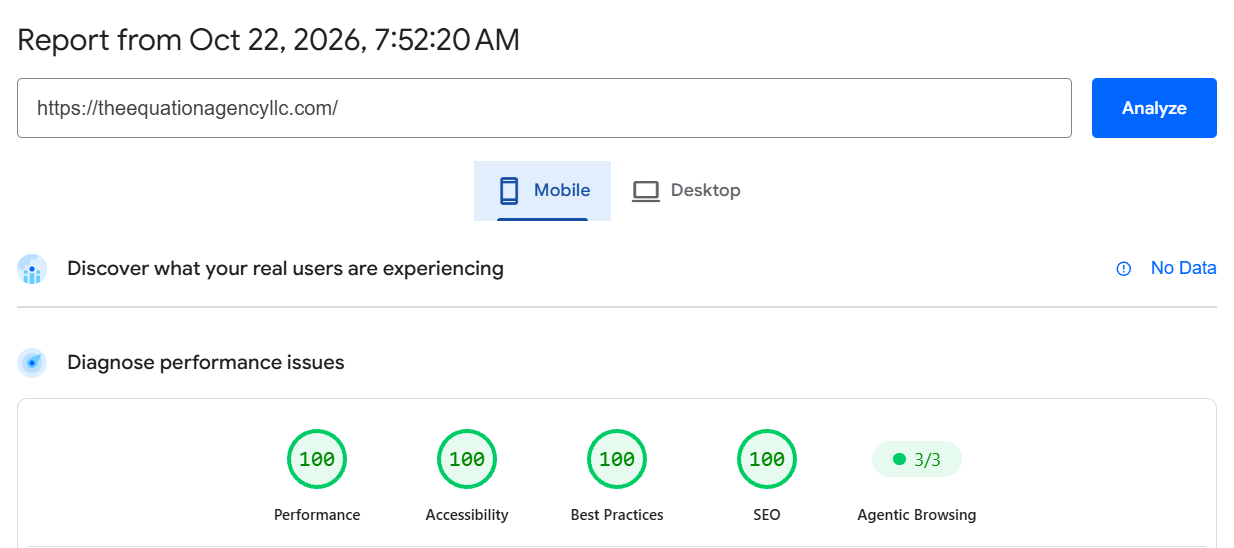
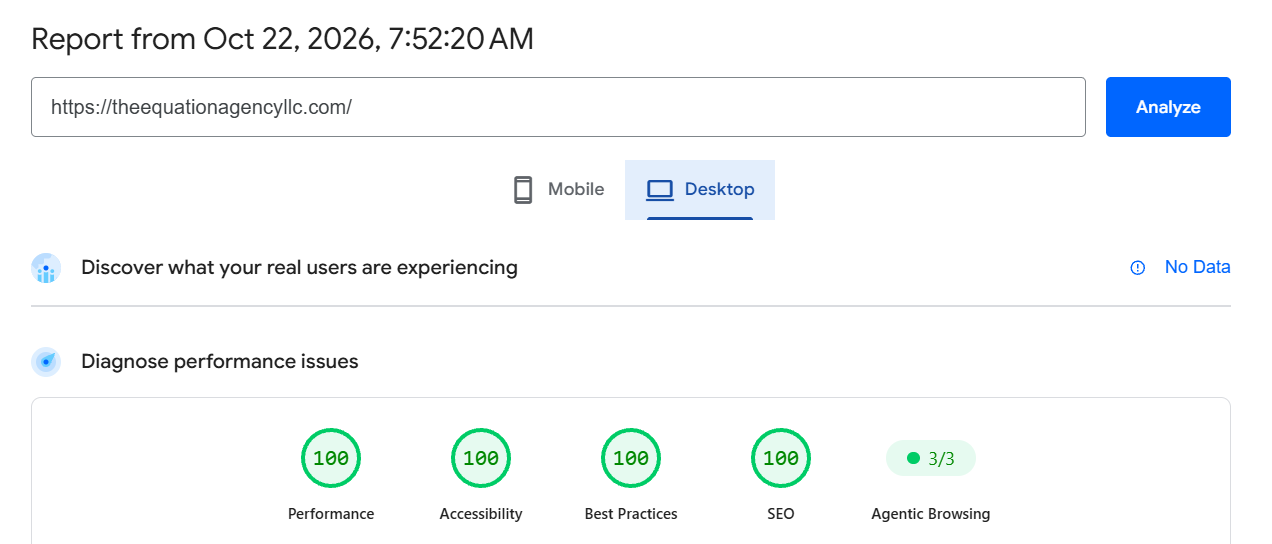
These are our results, straight from Google. Both screenshots come from Google PageSpeed Insights at pagespeed.web.dev, Google's free speed test. Verify our results yourself, then test your own website the same way.
Did your website score lower than ours? Book a free consultation. We will go over your PageSpeed report with you and show you what to fix first.
Not every website can reach 100 in all four categories. Chat widgets, booking calendars, tracking tags, ad scripts and heavy plugins can hold a site at 98 or 99, however much it is tuned. A 98 or 99 still passes: PageSpeed Insights rates any score from 90 to 100 as good. Scores also move a point or two from one test to the next. We always give every site our best effort.
Looking for results like these?
Core Web Vitals: The Numbers Google Uses
Core Web Vitals are three measures of how a page feels to a real visitor. Google uses them as part of its page experience signals. These are the thresholds Google publishes:
| Metric | What it measures | Good | Needs work | Poor |
|---|---|---|---|---|
| LCP | How fast the main content appears | 2.5 s or less | 2.5 to 4 s | Over 4 s |
| INP | How fast the page reacts to a tap or click | 200 ms or less | 200 to 500 ms | Over 500 ms |
| CLS | How much the layout jumps while it loads | 0.1 or less | 0.1 to 0.25 | Over 0.25 |
Google judges these numbers at the 75th percentile of real page loads. In plain words, three out of four visits must meet the target for the page to pass. Mobile and desktop are measured separately.
The real-user data comes from the Chrome UX Report. It covers Chrome users who share usage statistics, over the last 28 days. So a fix you make today takes up to four weeks to show fully in that data.
INP replaced First Input Delay (FID) as a Core Web Vital in March 2024. INP looks at every tap and click on the page, not only the first one. Many sites that passed FID now fail INP, mostly because of heavy JavaScript.
Small sites often have too few visits for Google to report real-user data. Then Search Console shows no data, and the Lighthouse lab test is the best guide you have.
How to read the Core Web Vitals report in Search Console
Google Search Console has a free Core Web Vitals report for your site. It sorts your pages into three groups: Good, Need improvement and Poor. It shows mobile and desktop separately, because Google measures them separately.
Pages that look alike are grouped together. If one product page is slow, the report often shows a whole group of similar pages as slow. Fix the template they share, not each page one by one.
After a fix, press Validate fix in the report. Google then watches real visits for about 28 days before it marks the problem as fixed. Our audit and the report work well together: the audit shows what to change today, and the report confirms the change with real users.
Our scan uses Google's Lighthouse lab test on a simulated mobile phone. A lab test cannot measure INP, because INP needs a real person tapping the page. So we report Total Blocking Time, the lab number that tracks INP most closely.
Data from real visitors comes from Google Search Console and the Chrome UX Report. We add it when we work on your site.
How Google Uses Page Speed to Decide Who Gets the Traffic
Google wants to send searchers to pages that answer their question and are pleasant to use. Its documentation says its core ranking systems look at a variety of signals that line up with page experience. Core Web Vitals are one of them.
Relevance still comes first. A slow page with the best answer can outrank a fast page with a weak one. But for most business searches, many pages answer the question well. When that happens, page experience can help decide which page wins the visit.
Google is also clear that good scores alone do not guarantee top rankings. Think of speed as the price of entry, not the prize.
Speed changes how much of your site Google reads
Speed matters before ranking even starts. Google decides how many pages to crawl on each site. When your server answers quickly and steadily, Google crawls more. When it slows down or returns server errors, Google crawls less.
If a site keeps answering "service unavailable" (503) or "too many requests" (429) for more than two days, Google may drop those pages from its index. A struggling server can quietly remove pages from search.
Google ranks the mobile version of your site
Google uses the mobile version of a page for indexing and ranking. If your site is fast on a desktop but slow on a phone, the phone version is the one that counts. Most Lighthouse and Core Web Vitals problems are worse on mobile.
Speed matters even more for local searches
Searches for a local service, such as a plumber, a dentist or a lawyer, mostly happen on phones. Often the person is in a hurry. They tap a result, and if the page is slow they go back and tap the next business on the list.
That second business gets the call, even if your Google Business Profile ranked first. A fast, simple page with your phone number at the top turns more of those local visits into calls.
Speed decides what visitors do after the click
Rankings are only half of the story. In a study Google commissioned from Deloitte, a 0.1-second improvement in mobile site speed raised retail conversions by 8.4% and travel conversions by 10.1%. Visitors who wait leave, and many never come back.
So page speed affects your traffic twice. First in how Google treats your pages, and again in how many visitors stay long enough to call, book or buy.
The Most Common Page Speed Problems, and How to Fix Them
These are the problems we find most often on business websites. Your report names the ones on your site.
- Images that are too large. A photo straight from a camera can weigh several megabytes. Resize it to the size it is shown at, and save it as WebP or AVIF. Load images below the first screen only when the visitor scrolls to them.
- Too many scripts and plugins. Every chat widget, tracking tag, slider and plugin adds JavaScript that the phone must run. Remove what you do not use. Load the rest after the page appears.
- A slow server. If the server takes more than about half a second to answer, every other number suffers. Better hosting, server caching and a content delivery network (CDN) fix most of it.
- CSS and fonts that block the page. The browser waits for these files before it shows anything. Keep the CSS small, load fonts early and give them a fallback so text shows right away.
- Layout that jumps. Images, videos and ads without a set size push text down as they load. Give every image and embed a width and height, and reserve space for banners.
- No caching. Without cache headers, returning visitors download everything again. Set long cache times for images, CSS and scripts.
- Heavy page builders and themes. Some themes load code for features you never use on every page. Sometimes the fastest fix is a lighter theme or a custom build.
Most of these fixes are invisible to your visitors except in one way: the site feels fast. Our website speed optimization service handles them for you, and our guide to Core Web Vitals goes deeper.
The Requirements: What Google Expects From Every Site
In SEO, compliance means meeting the technical baseline that Google, browsers and email providers expect. None of it is optional anymore. Here is the checklist our audit measures your site against.
- Google can crawl and index the page. Google's Search Essentials list three technical requirements. Googlebot is not blocked, the page works (it returns HTTP 200) and the page has indexable content. Our audit checks all three, plus your sitemap and canonical tags.
- Core Web Vitals pass. LCP of 2.5 seconds or less, INP of 200 milliseconds or less and CLS of 0.1 or less, for three out of four real visits.
- HTTPS everywhere. A valid certificate, every page on HTTPS and plain HTTP redirected to it. Browsers mark sites without it as "Not secure".
- Mobile-friendly pages. A viewport tag, readable text, buttons that are easy to tap and no pop-up that covers the content.
- Accessible to everyone. Labels on form fields, alt text on images, enough color contrast and a declared page language. Our checks cover these basics. They are a starting point, not a legal accessibility review.
- Safe for visitors. Security headers such as HSTS and a content security policy, no mixed content and no exposed server versions.
- Email that reaches the inbox. Since 2024, Google and Yahoo have required bulk senders to authenticate their email with SPF, DKIM and DMARC. Missing records can send your quotes and invoices to spam. Our audit checks your domain's records.
- A clear structure for search engines and AI. One title and one H1 per page, a meta description, structured data and content that loads without JavaScript.
A site that misses several of these can still rank for a while. But each gap gives Google, a browser or an email provider one more reason to trust it a little less.
Seen a Drop in Organic Traffic? Here Is Where to Look
A sudden drop in traffic from Google is stressful. The good news is that most drops have a cause you can find. Page speed and technical problems are among the most common causes, and they are often the quickest to fix.
Here are the usual suspects, in the order we check them. For each one, we say whether the free audit can spot it.
1. Google can no longer crawl or index your pages
A stray noindex tag, a robots.txt rule or a bot-protection setting can hide your site from Google overnight. It often happens after a redesign, a plugin update or a hosting change. The free audit checks this first. If it finds the problem, your score is capped at 45.
2. Your server got slower or started failing
A cheaper hosting plan, a traffic spike or a broken plugin can make a server slow or unstable. Google then crawls less, so fewer new pages and updates reach search. The free audit measures your server response time and reports errors on the pages it reads.
3. Your Core Web Vitals slipped
New chat widgets, tracking tags, sliders and page builders add JavaScript, and each one pushes LCP and INP up. You may not notice on fast office Wi-Fi, but your visitors on phones do. The free audit runs Lighthouse and shows which measurement fails.
4. A redesign or migration broke your URLs
New page addresses without redirects, missing canonical tags or links to old pages can wipe out rankings you built over years. The free audit checks canonicals, broken links and redirects on a sample of pages. A full-site crawl checks every page.
5. Your mobile site falls short
Google ranks the mobile version. So tiny text, pop-ups or missing content on a phone can cost you rankings even when the desktop looks perfect. The free audit checks the mobile viewport, layout shift and pop-ups.
6. A Google update changed the rules
Google updates its ranking systems several times a year. A core update can lift some sites and lower others, often because of content quality and trust signals. The free audit checks trust signals (E-E-A-T). Matching a drop to an update needs your Search Console data, which we review on the free consultation.
7. AI answers are taking the clicks
Google's AI Overviews and other AI tools now answer many questions right in the results. Your impressions may hold steady while clicks fall. The free audit checks how ready your pages are to be quoted by AI answers, so you can win the citation instead of losing the click.
8. Your tracking broke, not your traffic
Sometimes traffic did not drop at all. An analytics tag fell off during an update, so the counter stopped counting. The free audit checks whether analytics is installed.
9. A security problem or a hacked site
Malware, spam pages or mixed content can trigger browser warnings and drive visitors away. The free audit checks HTTPS, mixed content and security headers. A hacked site needs a closer look, so book a call if you suspect one.
10. Competitors, links and seasons
Some drops come from outside your site: a competitor that improved, backlinks you lost or a slow season. The audit cannot see these. A consultation with your Search Console data can.
How long recovery takes
Recovery speed depends on the cause. When Google was blocked, the fix can show within days of Google crawling the page again. You can ask Google to recrawl a page with the URL Inspection tool in Search Console.
Speed fixes take longer to show in the data. Lighthouse sees them right away, but the real-user Core Web Vitals report uses 28 days of visits. Rankings follow as Google recrawls and re-evaluates your pages.
Drops caused by a core update can take the longest. Google has said that sites which improve may not see the full effect until a later update. That is why the best time to fix speed, structure and trust signals is before the next drop, not after it.
Not sure which one hit you? Run the free audit first. Then book a free 30-minute consultation, and we will compare the report with your traffic history. Many drops are much easier to fix once the cause is clear. Learn more about our traffic recovery service.
What Your Free SEO Audit Includes
Most free SEO tools give you a number and a long list of warnings. We built this audit to answer a simpler question. What is stopping Google, AI search and your customers from finding you? Here is what lands in your inbox.
- Your overall score. A number from 0 to 100 and a grade from A to F. You also see how many checks failed and how many need a closer look.
- Your score in each of the 13 areas. You see at a glance which part of your site is healthy and which part needs work.
- Your biggest problems, in plain words. The email names the issues that matter most for your business and what each one costs you.
- The full online report. One button opens every check: what we found, why it matters and how to fix it.
- A way to talk it through. If you want, book a free 30-minute call to go over it with us. It is never required.
How the Free Audit Works
- You send your website. Fill in the form above. It takes less than a minute.
- We scan your site. Our scanner reads your home page and up to six more pages from across your sitemap. It also reads your security headers and your DNS records. Then it asks Google PageSpeed Insights for your Lighthouse and Core Web Vitals numbers. The scan takes about a minute.
- The report reaches your inbox. It usually arrives in about 5 minutes, in English or Spanish, from The Equation Agency LLC.
- You decide what happens next. Fix the issues yourself, hand the report to your developer or ask us to fix them. We follow up by email at most twice. Every email has an unsubscribe link.
A Look at What You Receive
The panels below show the layout of the report with sample numbers. Your report shows the real data from your own site.
Your overall score
Grade C
14 checks failed · 23 to review
Your score by area
Each finding, with its fix
Fail · Security
No HSTS header
What we found: the site does not tell browsers to always use HTTPS.
Why it matters: a visitor can be sent to an insecure version of the page.
How to fix it: send a Strict-Transport-Security header with a max-age of at least one year.
Sample data for illustration only.
What We Check: 13 Areas, More Than 120 Checks
Every check below runs in every free audit. We only report what we could measure. Sometimes a check cannot run, for example when Google's PageSpeed service does not answer. Then the report marks it as not measured. It never invents a result.
The areas are listed by how much they count toward your score, from the most to the least.
1. Core Web Vitals (Google)
When Google PageSpeed Insights answers, we include Google's own Lighthouse scores. We also include its lab measurements of your page on a simulated mobile phone.
- Lighthouse Performance score
- Lighthouse Accessibility score
- Lighthouse Best Practices score
- Lighthouse SEO score
- Largest Contentful Paint (LCP)
- Cumulative Layout Shift (CLS)
- Total Blocking Time (the lab stand-in for INP)
2. On-Page SEO
These are the basics Google reads on every page. Each one is small, but together they decide how your page shows up in search results.
- Title tag
- Only one title tag
- Meta description
- Page can be indexed
- One H1 heading
- Heading structure
- Canonical URL
- Social sharing tags (Open Graph)
- Twitter Card
- Image alt text
- Content depth
- Structured data (schema)
- Schema coverage
- Video schema
- hreflang for sites in more than one language
- Mobile viewport
3. AI Search Readiness
AI answers from Google, ChatGPT and others quote pages that are easy to read and easy to cite. These checks look for what makes your pages quotable.
- FAQ schema
- Article schema
- Breadcrumb schema
- Headings phrased as questions
- Answer-first paragraphs
- Facts, figures and sources worth citing
- Freshness signals such as dates
- Content feed (RSS or Atom)
- Clean content that is easy to extract
- Content that loads without JavaScript
- AI crawler rules in robots.txt
- llms.txt file
4. Crawler Access and Indexing
If Google cannot get in, nothing else matters. We fetch your pages the way a search crawler does. Then we compare the answer with what a visitor sees.
- Pages are served to search crawlers
- A bot-protection layer that could block Google
- robots.txt lets Googlebot in
- Sitemap URLs answer correctly
- Canonical tags point at the right page
- The www and bare domain agree
5. Page Experience
These checks look at how your page behaves while it loads, mostly on a phone.
- Core Web Vitals setup
- Mobile-friendly layout
- Image sizes set, so nothing jumps
- Embed sizes set, so nothing jumps
- Main image loads early (LCP preload)
- Web fonts load well
- Responsive images (srcset)
- No document.write
- No pop-up that covers the page
6. Trust Signals (E-E-A-T)
Google wants to know who stands behind a site. So do your customers. These checks look for the signals that answer that question.
- An author or accountable person
- About page linked
- A way to contact you
- Business name, address and phone
- Organization schema
- Local business schema and address
- Verified social profiles
- Reviews and ratings schema
- Content freshness
- Privacy policy and terms
7. Site Crawl (Sample)
We read your home page plus up to six more pages spread across your sitemap, one from each main section. That is how we find problems that repeat across the site.
- Number of pages analyzed
- Unique page titles
- Unique meta descriptions
- A title on every page
- No accidental noindex
- Canonical tags across the site
- No broken internal links
- Internal linking depth
8. Security
Security headers protect your visitors and show browsers that your site is safe. Most sites miss several of them.
- HSTS
- Content Security Policy
- X-Content-Type-Options
- Clickjacking protection
- Referrer-Policy
- Permissions-Policy
- No mixed content
- Server version kept private
- Secure cookie settings
- Subresource Integrity
9. Performance
These checks find what makes your page slow before a visitor even sees it.
- Server response time
- HTML size
- Compression
- Number of scripts
- Cache headers
- Lazy-loaded images
- Modern image formats (WebP, AVIF)
- CSS that blocks the first paint
- Page size in elements (DOM size)
- Resource hints (preconnect, preload)
10. Accessibility
An accessible site works for more people, including people who use screen readers. Many of these fixes also help SEO.
- Page language declared
- HTML5 doctype
- Page title present
- Pinch-zoom allowed
- Form fields have labels
- Form fields say what they collect
- Link text that makes sense alone
- Page regions (landmarks)
- Images have alt text
- Skip-to-content link
11. DNS and Email
Your domain's records decide whether your site loads everywhere and whether your emails reach the inbox or land in spam.
- A record
- IPv6 (AAAA record)
- MX records for email
- SPF record
- DMARC record
- DKIM signing
- DNSSEC
- MTA-STS
- CAA record
- Nameservers
12. Best Practices
These are the small things every healthy site has in place.
- robots.txt file
- XML sitemap
- A real 404 page
- Character encoding
- Standards-mode doctype
- Favicon
- Analytics installed
- Social profiles linked
- No outdated HTML
13. SSL and HTTPS
A secure connection is the minimum Google and browsers expect.
- HTTPS turned on
- A valid certificate
- HTTP redirects to HTTPS
- HSTS strength
How Your Score Is Calculated
Each check passes, gets a warning or fails. A pass earns full credit, a warning earns half and a fail earns nothing. Each area then gets its own score from 0 to 100.
Your overall score is a weighted average of the 13 areas. The areas closest to Google's own signals count the most:
| Area | Weight |
|---|---|
| Core Web Vitals (Google) | 15 |
| On-Page SEO | 14 |
| AI Search Readiness | 13 |
| Crawler Access and Indexing | 12 |
| Page Experience | 11 |
| Trust Signals (E-E-A-T) | 10 |
| Site Crawl (Sample) | 10 |
| Security | 8 |
| Performance | 8 |
| Accessibility | 8 |
| DNS and Email | 6 |
| Best Practices | 5 |
| SSL and HTTPS | 5 |
If an area could not be measured, its weight is spread over the areas we did measure. A missing area never pulls your score down.
Your grade follows from the score:
- A (90 to 100): strong. Keep it that way with regular checks.
- B (80 to 89): good, with a few fixes to make.
- C (70 to 79): fair. Real gaps are costing you visibility.
- D (60 to 69): weak. Several areas need work.
- F (below 60): serious problems. Start with the fixes marked as failing.
The one rule that overrides the rest: if Google cannot crawl or index your site, your score is capped at 45, grade F. That happens when your home page is set to noindex, when robots.txt blocks it, or when most of your sitemap pages refuse crawlers. A site Google cannot read cannot be healthy, however good it looks.
What the Free Audit Is, and What It Is Not
- It is a diagnosis, not a promise. It shows what is holding your site back. No one can promise you a position in Google.
- It checks your site from the outside. It imitates Google, but it is not Google. The source that confirms what Google indexes is Google Search Console.
- It is a sample. It reads your home page and up to six more pages. A crawl of every page is part of our paid SEO work.
- It reports only what it measured. A check that could not run is marked as not measured. It is never scored and never billed.
- The full online report is in English. The email comes in English or Spanish. The online report it links to is in English for now.
Free Audit, Full-Site Crawl or Technical SEO Audit?
The free audit is the first step. When you need more depth, these are the next levels.
| Free SEO audit | Full-site crawl | Technical SEO audit | |
|---|---|---|---|
| Pages checked | Home page and up to 6 sample pages | Every page, up to 2,000 | Every page, plus Google's own data |
| What you get | Score, grade, 13 areas and your top problems | About 40 problem types, each with the exact pages and the fix | A plan in order of impact, the fixes made and a re-check |
| Search Console data | No | When connected | Yes |
| After the fixes | Run it again yourself | Re-check each problem | Scheduled re-scans with a score history |
| Who does the work | You or your developer | Our developers, as a work order | Our team, from start to finish |
| Cost | Free | Quoted with your project | Quoted with your project |
What to Do With Your Report
A long list of problems can feel like a lot. Fix them in this order. It is the same order we follow on client sites.
- Google access first. If your score is capped at 45, start there. Remove a stray noindex, open robots.txt to Googlebot and fix sitemap pages that do not answer. Nothing else helps until Google can read your pages.
- Speed and mobile next. Fix a main image that loads slowly, a layout that jumps and scripts that block the page. These touch every visitor.
- Titles, descriptions and headings. Give every page one clear title, one description and one H1. These are often quick fixes.
- Trust and AI readiness. Add an About page, real contact details, business schema and question headings with direct answers. They help Google and AI answers trust and quote you.
- Security headers and email records. HSTS, a content security policy, SPF, DKIM and DMARC protect your visitors and keep your emails out of spam.
Then run the audit again a day later. Your new score shows what changed.
Then keep it that way. New plugins, new tracking tags and new photos slow a site down a little at a time. Test again after every change to your site, and at least once a month. Our clients get scheduled scans with a score history, so a slide shows up before it costs traffic.
Keep your Search Console account connected as well. It is free, it shows real-user Core Web Vitals and indexing problems, and it is the first place Google warns you when something breaks.
Book a Free 30-Minute Consultation
A report tells you what is wrong. A conversation tells you what to do first. That is why every free audit comes with the option of a free consultation with our team.
It is free, and there is no obligation. Many owners use the call to plan fixes they will make themselves or hand to their own developer. That is fine with us.
What we cover on the call
- We walk through your report with you, in plain language.
- We pick the three fixes that will move your traffic or leads the most.
- We tell you which fixes you can make yourself and which need a developer.
- If you connect Google Search Console, we look at your real traffic and indexing data together.
- If your traffic dropped, we match the drop against the likely causes above.
- If you want our help, we explain the work and send you a written quote. If you do not, you keep everything we found.
Who the call is for
Owners and marketing leads of businesses that win customers from Google. That includes service businesses, professional firms, clinics, contractors, stores and agencies. We work with companies across Florida, the United States and Latin America, in English and Spanish.
Your Free SEO Audit at a Glance
- Page speed and Google's requirements first: Lighthouse, Core Web Vitals, HTTPS, mobile and accessibility
- More than 120 checks in 13 areas, from Google indexing to AI search
- A report by email in about 5 minutes, in English or Spanish
- A score from 0 to 100, a grade from A to F and a score for every area
- A score capped at 45 when Google cannot crawl or index your site
- Only measured results: nothing is guessed or invented
- Free, with no credit card and no obligation
- A free 30-minute consultation to turn the report into a plan
Common Questions About Our Free SEO Audit
Yes. There is no cost and we never ask for payment details. We use your email to send the report. If you do not book a call or reply, we send at most two follow-up emails. Every email has an unsubscribe link.
Usually about 5 minutes. The scan itself takes about a minute, and the email goes out as soon as it ends. If you do not see it, check your spam or junk folder.
Some sites block scanners, do not answer, or are really a social media or booking page. In that case we do not invent a report. We send you a short email, and Victor J. Rosario reviews your site personally. He usually replies the same business day.
Most checkers read one page and score everything they find. Ours also reads sample pages from across your sitemap and checks your site the way Google's crawler sees it. It asks Google PageSpeed Insights for real Lighthouse numbers. It caps the score when Google cannot index you, and it never scores a check it could not measure.
Not always. The scan checks your site from the outside and imitates Google, but it is not Google. The only source that confirms what Google indexes is Google Search Console. That is why the score is capped at 45 when the scan finds that Google cannot crawl or index your site.
Your home page, plus up to six more pages taken from across your XML sitemap, one from each main section. A crawl of every page is part of our paid SEO work.
Yes. Send the form again with the same website. We send one automatic report per website every 24 hours, so wait a day before you run it again.
The email with your score and main problems comes in English or Spanish, based on the page you use. The full online report the email links to is in English for now.
If you want us to. Book a call and we will go over your report, explain what each fix involves and quote the work. Many owners hand the report to their own developer instead. Both are fine.
We use it to send your report and to contact you about it. We do not sell it. The details are in our Privacy Policy.
Not directly. Google's ranking systems use real-user Core Web Vitals from Chrome, not the Lighthouse lab score. Lighthouse is still the best tool to find what slows a page down, and the fixes it points to usually improve the real-user numbers too.
Lighthouse runs one test under simulated conditions. Network timing, server load and the test machine all vary, so the score moves a few points between runs. Look at the trend over several tests, and at the real-user data when Google has it.
Lighthouse tests your page on a simulated mid-range phone with a slower connection, because that is how many of your visitors browse. A page that feels instant on office Wi-Fi can still be slow on a phone.
Yes, in two ways. Core Web Vitals are part of the signals Google's ranking systems use, and a slow or failing server makes Google crawl less of your site. Then, after the click, slow pages lose visitors before they call, book or buy.
Yes. The 30-minute consultation is free and has no obligation. We go over your report, pick the fixes that matter most and answer your questions. If you want our help afterward, we send a written quote.